
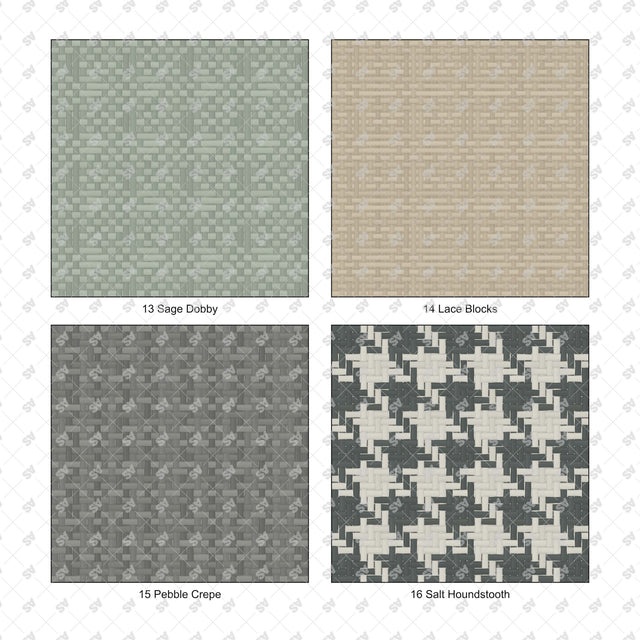


Illustrator Pattern Library - Woven Fabrics for Interiors
Description: Set of 25 seamless woven fabric patterns supplied as an Adobe Illustrator AI swatch library and an editable SVG catalog. Visible warp and weft, varied yarn thickness and subtle fiber shading represent linen, basket weaves, twills, herringbones, checks and geometric woven motifs in muted colors.
Designed for architects, interior designers and students preparing interior elevations, furniture drawings, textile studies and presentation boards.
Included Elements: Flax Linen, Oat Slub, Chalk Basket, Reed Rep, Open Gauze, Mineral Twill, Tobacco Serge, Moss Herringbone, Graphite Chevron, Ash Diamond, Pearl Satin, Waffle Linen, Sage Dobby, Lace Blocks, Pebble Crepe, Salt Houndstooth, Sage Glen Check, Ink Windowpane, Tobacco Tattersall, Heather Pinstripe, Nordic Ticking, Dobby Cross, Honeycomb Cell, Stepped Jacquard, Fjord Ripple.
Use Cases: Upholstered furniture, curtains, cushions, headboards and textile wall panels in residential, hospitality and retail drawings.
Why This Set:
Distinct textile designs with seamless repeats
Ready-to-use Illustrator pattern fills without embedded bitmap textures
Vector catalog with separate sample fills
File Format: Adobe Illustrator .AI pattern swatch library and editable .SVG pattern catalog.
How to Install the Library:
- Extract the ZIP and keep Woven_Fabrics_for_Interiors_25_Swatch_Library.ai in a permanent folder.
- In Adobe Illustrator, open Window > Swatches.
- From the Swatches panel menu, choose Open Swatch Library > Other Library.
- Select the AI swatch library and click Open.
- Select a shape, activate its Fill, then click a pattern in the library panel.
Free Products
Free products can be used in any type of use - both academic and commercial. When using a set, a pack or part of it, you are required to give full credit to Studio Alternativi (with an active link for online versions) and to the product's creator.
When a product is used in a project that is published on social media, you are required to give full credit to Studio Alternativi (with an active tag to Studio Alternativi’s profile).
Educational (Academic) Use
When using a product tagged with “Educational Use” you are allowed to use it for academic purposes only. Giving credit to Studio Alternativi is much appreciated.
Commercial Use
Once bought, you are free to use the product without giving attribution.
What is strictly not allowed to do (in all cases)?
Products can’t be sold without being part of a bigger artwork like a drawing, collage, rendering, poster or any other work combining Studio Alternativi’s digital products with other graphic or digital elements.
Also, you are not allowed to use products from Studio Alternativi in similar or any competing services.
RAR / ZIP Folders
Please use WINRAR - a free software to open the compressed folder.
AI Vector Files
Please use Adobe Illustrator to open the files
ABR (Photoshop Brushes)
1. Open Adobe Photoshop
2. Open the Brushes Panel: Window > Brushes
3. Select Import Brushes
4. Locate the .abr file on your hard drive and click open to install
5. The brushes will appear in your Brushes Panel whenever the Brush Tool is selected