
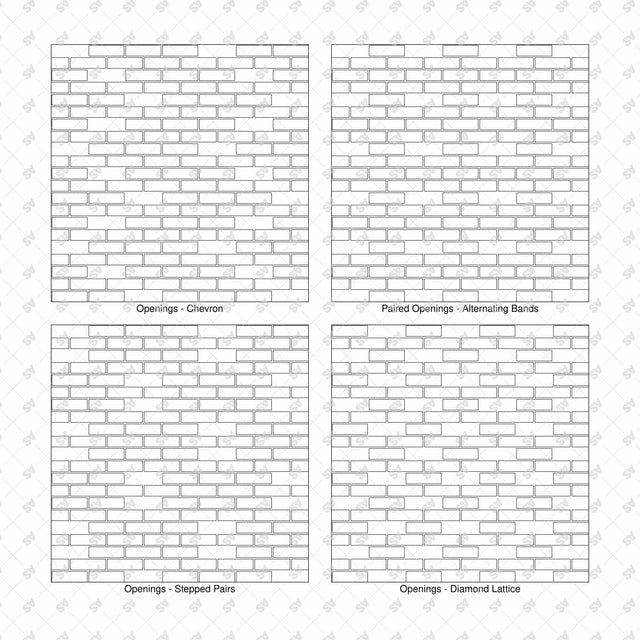


Illustrator Pattern Library - Open Brick Screen Patterns - 16 Swatches
Description: Set of 16 seamless open brick screen patterns supplied as an Adobe Illustrator AI swatch library and editable SVG catalogs. Includes hit-and-miss brickwork, staggered ventilation openings, stepped arrangements and alternating open and solid courses in black vector line art.
Designed for architects, architecture students, landscape architects and architectural illustrators. Use the patterns to communicate perforated brick facades, courtyard enclosures, privacy screens and garden walls in elevation studies and presentations.
Included Elements: Staggered, raking and chevron vents; alternating open and solid courses; vents with double and triple solid courses; staggered, diagonal and chevron openings; paired opening bands; stepped pairs; diamond lattice openings; alternating wide piers; three-course rhythms; clustered bands; and staggered double-height openings.
Use Cases: Perforated brick facades, courtyard screens, garden enclosures, privacy walls, balcony screens, ventilation concepts and architectural presentation boards.
Why This Set:
- 16 named open-brick screen layouts
- Seamless repeats with outlined bricks and unfilled openings
- Editable black vector linework
- AI swatch library for filling elevation shapes in Illustrator
File Format: Adobe Illustrator .AI pattern swatch library + editable .SVG vector catalogs. Catalog captions are separate editable text objects in Arial. Each pattern sample, border and caption is individually selectable.
How to Install the Library:
- Extract the downloaded ZIP and keep the Swatch_Library.ai file in a permanent folder.
- In Adobe Illustrator, open Window > Swatches.
- Open the Swatches panel menu and choose Open Swatch Library > Other Library.
- Select Open_Brick_Screens_16_Swatch_Library.ai and click Open. The patterns appear in a separate library panel.
- Select a shape, activate its Fill, then click a pattern swatch to apply it.
Free Products
Free products can be used in any type of use - both academic and commercial. When using a set, a pack or part of it, you are required to give full credit to Studio Alternativi (with an active link for online versions) and to the product's creator.
When a product is used in a project that is published on social media, you are required to give full credit to Studio Alternativi (with an active tag to Studio Alternativi’s profile).
Educational (Academic) Use
When using a product tagged with “Educational Use” you are allowed to use it for academic purposes only. Giving credit to Studio Alternativi is much appreciated.
Commercial Use
Once bought, you are free to use the product without giving attribution.
What is strictly not allowed to do (in all cases)?
Products can’t be sold without being part of a bigger artwork like a drawing, collage, rendering, poster or any other work combining Studio Alternativi’s digital products with other graphic or digital elements.
Also, you are not allowed to use products from Studio Alternativi in similar or any competing services.
RAR / ZIP Folders
Please use WINRAR - a free software to open the compressed folder.
AI Vector Files
Please use Adobe Illustrator to open the files
ABR (Photoshop Brushes)
1. Open Adobe Photoshop
2. Open the Brushes Panel: Window > Brushes
3. Select Import Brushes
4. Locate the .abr file on your hard drive and click open to install
5. The brushes will appear in your Brushes Panel whenever the Brush Tool is selected