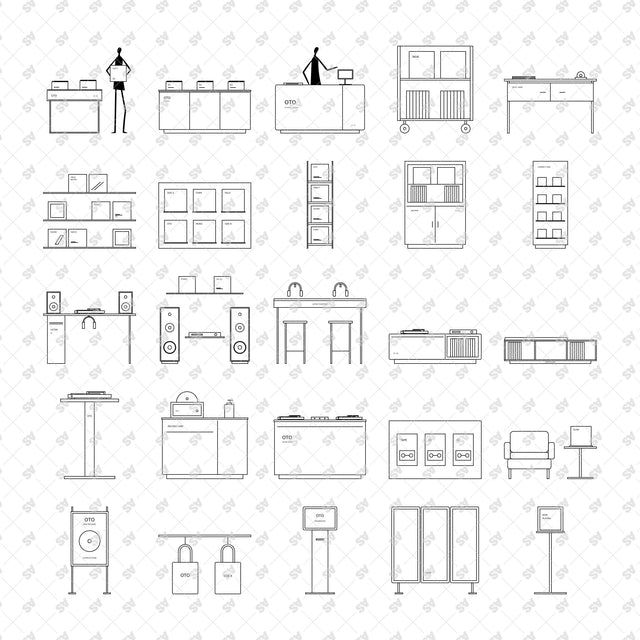
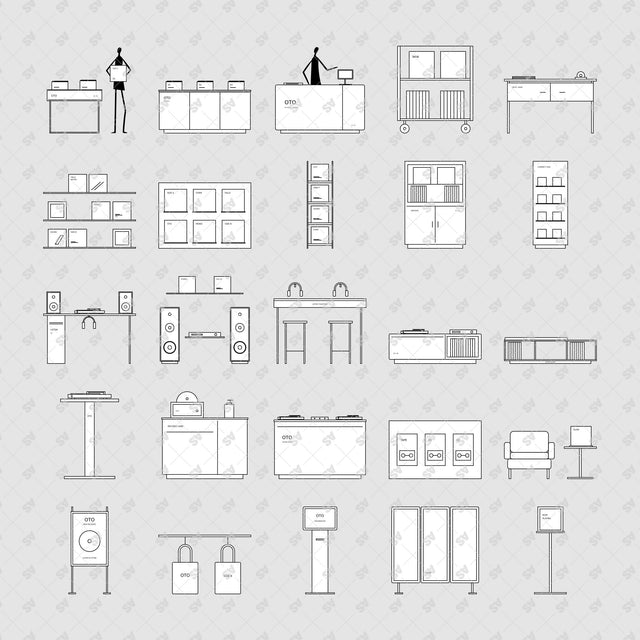


CAD, Vector, PNG Record Store in Front View
Description: Record-store furniture and display compositions in front view (elevation), drawn with clean linework, restrained typography and white object surfaces. Two abstract staff figures are integrated into the browsing and checkout arrangements.
Designed for architects, interior designers, students and visualizers working on record shops, listening bars, music cafes and residential listening rooms.
Included Elements: Record browsing bins, display islands, wall shelves, listening stations, turntable cabinets and pedestals, magazine racks, checkout counters, speaker displays, storage benches, headphone bars, sleeve displays, archive cabinets, record-cleaning stations, an armchair with side table, poster stands, tote rails, mobile trolleys, CD towers, cassette displays, a DJ booth, an information kiosk, acoustic screens, a packing desk and a now-playing stand.
Use Cases: Interior elevations, retail and joinery studies, listening-room layouts, presentation boards and architectural collages.
Why This Set:
25 separate CAD blocks at real-world scale in centimetres
PNGs with white surfaces and transparent surroundings
File Format: 1 CAD (DXF catalogue), 1 Vector (SVG catalogue) and 25 transparent PNG files at 300 dpi.
Free Products
Free products can be used in any type of use - both academic and commercial. When using a set, a pack or part of it, you are required to give full credit to Studio Alternativi (with an active link for online versions) and to the product's creator.
When a product is used in a project that is published on social media, you are required to give full credit to Studio Alternativi (with an active tag to Studio Alternativi’s profile).
Educational (Academic) Use
When using a product tagged with “Educational Use” you are allowed to use it for academic purposes only. Giving credit to Studio Alternativi is much appreciated.
Commercial Use
Once bought, you are free to use the product without giving attribution.
What is strictly not allowed to do (in all cases)?
Products can’t be sold without being part of a bigger artwork like a drawing, collage, rendering, poster or any other work combining Studio Alternativi’s digital products with other graphic or digital elements.
Also, you are not allowed to use products from Studio Alternativi in similar or any competing services.
RAR / ZIP Folders
Please use WINRAR - a free software to open the compressed folder.
AI Vector Files
Please use Adobe Illustrator to open the files
ABR (Photoshop Brushes)
1. Open Adobe Photoshop
2. Open the Brushes Panel: Window > Brushes
3. Select Import Brushes
4. Locate the .abr file on your hard drive and click open to install
5. The brushes will appear in your Brushes Panel whenever the Brush Tool is selected