
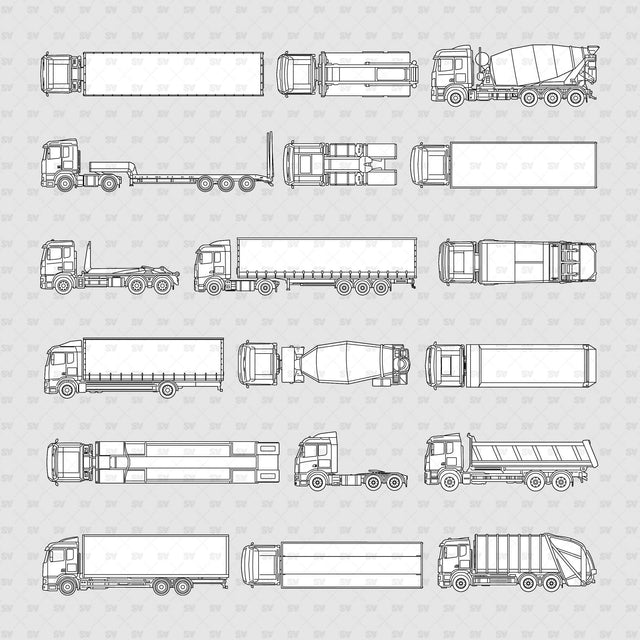


ArchiCAD Vector PNG Trucks in Top and Side Views
Description: ArchiCAD, Vector, and PNG set of nine trucks in top view (plan) and side view (elevation). The collection includes delivery, construction, and service vehicles for architectural drawings and urban presentations.
Designed for architects, students, urban designers, landscape designers, visualizers, and competition teams. Useful for streets, service yards, loading areas, industrial sites, construction sites, and logistics projects.
Included Elements: Nine trucks, including box trucks, a concrete mixer, a refuse truck, and a tipper truck. Each truck is supplied in top view (plan) and side view (elevation), with 18 individual PNGs in total.
Use Cases: Site plans, side elevations, streetscape drawings, loading-area layouts, industrial and logistics presentations, construction-site diagrams, competition boards, and post-digital collages.
Why This Set:
Nine trucks for adding scale and context to architectural drawings
Matching top (plan) and side (elevation) views for every truck
ArchiCAD and Illustrator files
Individual transparent PNGs for quick placement
Free four-truck Micro Set
File Format: ArchiCAD .PLN + Illustrator .AI + PNGs with transparent background.
Free Micro Set: Select Micro Set for the free four-truck download in top view (plan) and side view (elevation), including its own PLN, AI, and eight PNG files.
Free Products
Free products can be used in any type of use - both academic and commercial. When using a set, a pack or part of it, you are required to give full credit to Studio Alternativi (with an active link for online versions) and to the product's creator.
When a product is used in a project that is published on social media, you are required to give full credit to Studio Alternativi (with an active tag to Studio Alternativi’s profile).
Educational (Academic) Use
When using a product tagged with “Educational Use” you are allowed to use it for academic purposes only. Giving credit to Studio Alternativi is much appreciated.
Commercial Use
Once bought, you are free to use the product without giving attribution.
What is strictly not allowed to do (in all cases)?
Products can’t be sold without being part of a bigger artwork like a drawing, collage, rendering, poster or any other work combining Studio Alternativi’s digital products with other graphic or digital elements.
Also, you are not allowed to use products from Studio Alternativi in similar or any competing services.
RAR / ZIP Folders
Please use WINRAR - a free software to open the compressed folder.
AI Vector Files
Please use Adobe Illustrator to open the files
ABR (Photoshop Brushes)
1. Open Adobe Photoshop
2. Open the Brushes Panel: Window > Brushes
3. Select Import Brushes
4. Locate the .abr file on your hard drive and click open to install
5. The brushes will appear in your Brushes Panel whenever the Brush Tool is selected