
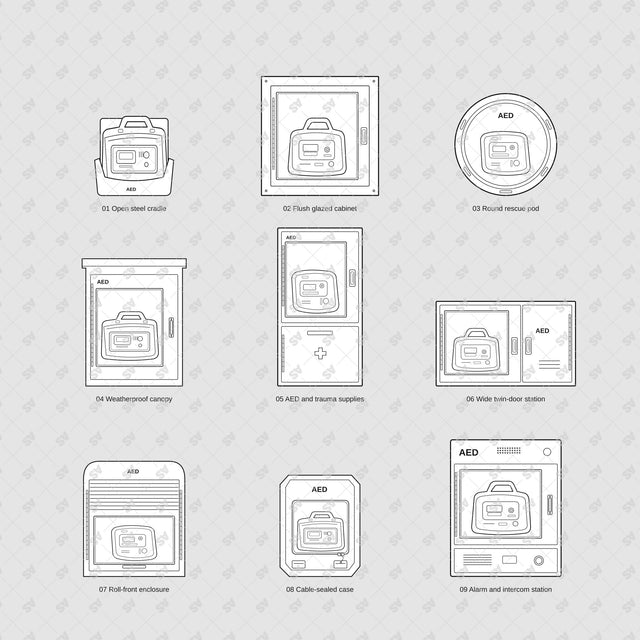


CAD, Vector, PNG Public Defibrillator (AED) Stations in Front View
Description: Set of wall-mounted public defibrillator (AED) stations shown from the front.
Designed for architects and interior designers.
Included Elements: Open holders, round cases, and wall cabinets. Some have glass doors, a cover for rain, or space for first aid supplies. The Full Set includes 9 designs. The Micro Set includes 4.
Use Cases: Add a defibrillator to a drawing of a school hallway, lobby, or train station.
Why This Set:
Choose a cabinet shape.
Place it on the wall in your own elevation drawing.
File Format: CAD file (.dxf), editable vector file (.svg), and one transparent PNG image (.png) per design.
Free Products
Free products can be used in any type of use - both academic and commercial. When using a set, a pack or part of it, you are required to give full credit to Studio Alternativi (with an active link for online versions) and to the product's creator.
When a product is used in a project that is published on social media, you are required to give full credit to Studio Alternativi (with an active tag to Studio Alternativi’s profile).
Educational (Academic) Use
When using a product tagged with “Educational Use” you are allowed to use it for academic purposes only. Giving credit to Studio Alternativi is much appreciated.
Commercial Use
Once bought, you are free to use the product without giving attribution.
What is strictly not allowed to do (in all cases)?
Products can’t be sold without being part of a bigger artwork like a drawing, collage, rendering, poster or any other work combining Studio Alternativi’s digital products with other graphic or digital elements.
Also, you are not allowed to use products from Studio Alternativi in similar or any competing services.
RAR / ZIP Folders
Please use WINRAR - a free software to open the compressed folder.
AI Vector Files
Please use Adobe Illustrator to open the files
ABR (Photoshop Brushes)
1. Open Adobe Photoshop
2. Open the Brushes Panel: Window > Brushes
3. Select Import Brushes
4. Locate the .abr file on your hard drive and click open to install
5. The brushes will appear in your Brushes Panel whenever the Brush Tool is selected